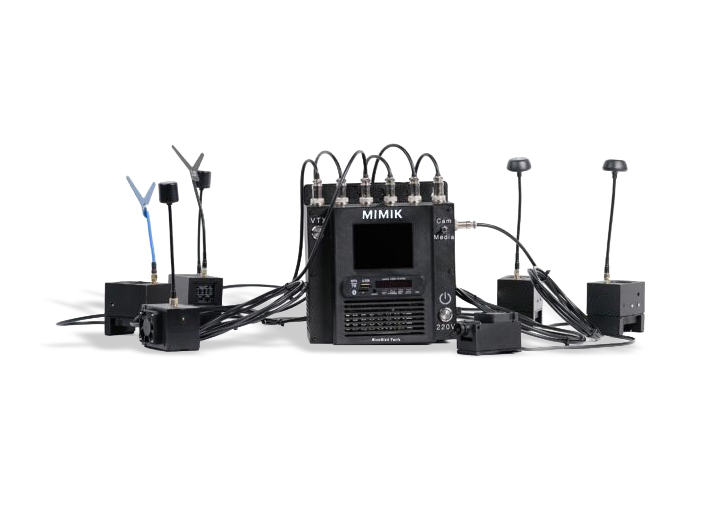
"Mimik" Test Video Signal Simulator
Download the manual to learn the connection and setup procedure for the "Mimik" test video signal simulator, and to review its technical specifications and operating recommendations.
The device is called the “MIMIK” FPV drone test video signal simulator.
The device is manufactured by BlueBird Tech.
It is designed to check the performance and demonstrate the capabilities of drone detectors by reproducing FPV drone video signals without the need to fly an actual drone.
The system consists of a main control unit, six video transmitters (VTX), a remote video camera, and a media player remote control.
The device runs on a 230V AC power supply.
The main unit has a 3.5-inch LED display.
The media player supports MP3, MP4, and HD 1080p video formats.
It uses a Foxeer Razer mini V2 (V3) remote camera.
The transmitters operate in the ranges of 1080–1400 MHz, 1680–1960 MHz, 3000–4938 MHz, and 4990–6184 MHz.
The maximum output power of the VTX 1.2GHz transmitter is 2500 mW.
The VTX 1.7GHz transmitter has four power modes: PIT, 25 mW, 200 mW, and 1600 mW.
The housings are made from PETG polymer material.
The remote units connect via cables with a GX16-3M/F connector.
The antennas must be spaced at least 50 cm apart from each other.
The main unit is powered on by pressing the “220V” button on the housing.
The source is selected using the switch on the right side of the housing — remote camera or media player.
Press and hold the function button for 3 seconds to enter BAND mode, press briefly to change the band, then repeat the process to move through CH and Power modes.
The VTX 3.3GHz transmitter supports 8 bands: A, b, E, F, r, P, L, U.
Yes, the simulator can be used both in a stationary position and while mounted on a moving vehicle.
The recommended continuous operating time should not exceed 180 minutes.