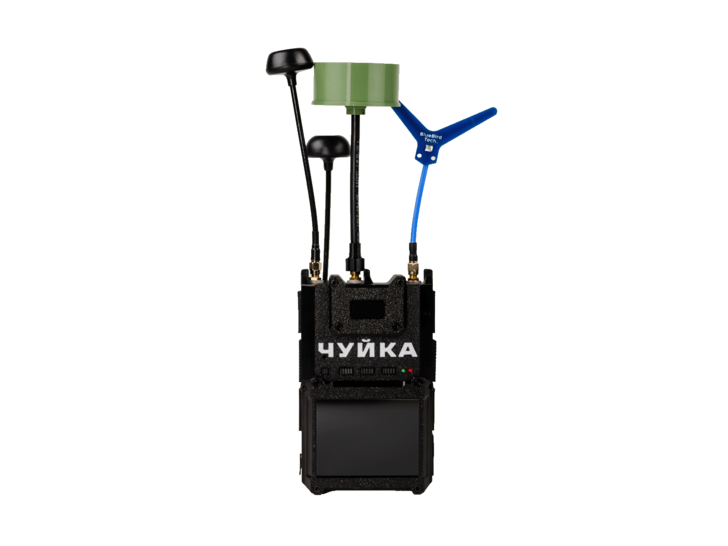
"Chuyka 4.0"
Download the manual to learn how to prepare the "Chuyka 4.0" for operation, connect antennas correctly, use detection modes, and follow safe operating recommendations.
The device is called the RESD “Chuyka 4.0” (radio-electronic surveillance device).
The device is designed to detect analog video signal sources — FPV drones, UAVs, ground robotic systems, flying-wing aircraft, and other equipment operating on analog video transmitters.
The device scans 4 bands: 1.2, 3.3, 5.8, and 8.8 (in the current version — 1080–2200, 2860–4500, 4860–6040, and 6040–8800 MHz).
Depending on the band, detection range is 3000 to 4000 m at a video transmitter power of 4W with no obstruction in the first Fresnel zone; actual range depends on the antenna type used.
Scan speed is 4–8 seconds, and the scan step is no more than 10 MHz across all bands.
The device runs on two 21700 cells rated at 5000 mAh in a 2S configuration, with an operating voltage range of 6.4–8.4V.
The built-in battery provides up to 2 hours of operation.
Yes, using an additional battery pack built on 4 x 21700 cells (5000 mAh, 2S2P), which adds up to 4 more hours of operation — up to 6 hours total.
The housing is made of PETG plastic.
The device has an IP54 housing protection rating.
The housing has 4 antenna connectors — one for each scanning band.
The package includes the “Chuyka 4.0” unit, a built-in battery, 4 antennas, a USB Type-C charging cable, an additional battery, a cable for connecting the additional battery (XT30), a car power cable (XT60), and a user manual.
The device emits a sound signal accompanied by light indication; the sound can be turned off with the Mute button, while the light indication remains active.
The small screen shows the number of detected signals, a band histogram, frequencies and channels of active signals, battery charge, and the current button assignments.
The large screen is used to view the intercepted video signal; the device also has a video output for connecting an external screen.
Press the Monitor button on the main screen — in this mode you can switch between channels using Up/Down and see the frequency, channel number, signal level, and RSSI.
No, while viewing a channel from a specific band, scanning of that band is temporarily paused (for example, when viewing a channel in the 5.8 GHz band, scanning continues only on the 1.3 and 3.3 GHz bands).
The “A” label indicates Auto mode, in which the device automatically adjusts the detection threshold based on the current noise level in the air.
The “V” label (Video Only / VD Only) means the device reacts only to signals with analog video characteristics, ignoring other interference sources (GSM, Wi-Fi, EW jamming, etc.).
The “X/D” label means the band is disabled and does not participate in scanning.
The recommended value for manual mode is 10–15%.
INV-V enables video inversion for the selected channel — used when the device detects a signal but the video isn’t displayed correctly due to a scrambler.
A channel is added to the blacklist for 10 minutes using the Alt+(+10m) combination; each additional press adds another 10 minutes, and holding the combination longer removes the channel from the blacklist.
Create a mobile hotspot named “update” with the password “update123,” then go to the OTA update menu on the device and download the Stable, Current, or Beta version.
You can revert to a previous version via Menu → Settings → Switch Firmware, selecting the desired version and pressing Boot — the device can store 2 to 5 firmware versions.
Available modes are On (fan always on, default), Off (fan off), and Auto (automatic fan control, available on board version 1.3.7 and above).
At 6.4V, the device displays a Critical Battery message and enters sleep mode 10 seconds later.
No, the device can only be fully powered off using the switch on the bottom of the housing — this is necessary to prevent excessive battery over-discharge.
For long-term storage, the device should be recharged at least once every 3 weeks.