logo-mobile
Меню
close
Academy arrow
Cart (0)
close

Instruction for “Genera-1200”

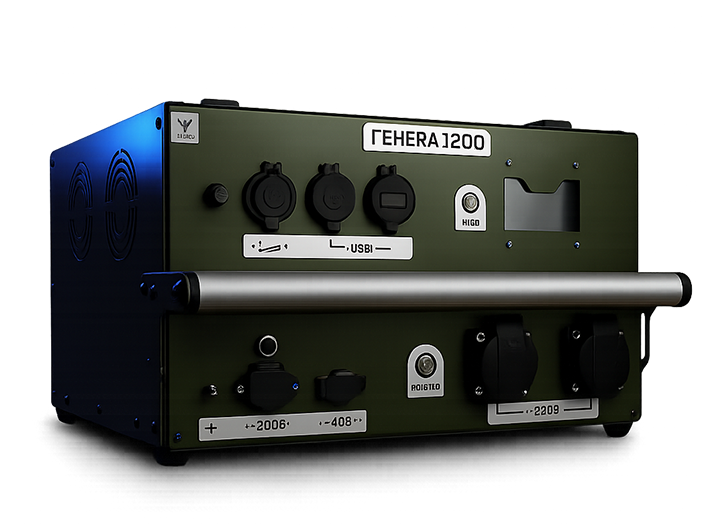
Charging station «Genera-1200»
Instructions for

Charging station «Genera-1200»

Download the manual to familiarize yourself with the preparation of the «Genera-1200» for operation, the rules for turning it on, charging, storage, transportation, and recommendations for safe use.

Frequently asked questions

The "Genera" power station fell into water or a puddle. What should I do?

Do not turn on the device or connect it to a charger or any equipment. Carefully wipe the enclosure with a dry cloth and leave the device in a dry, well-ventilated area. Do not disassemble the Genera yourself. If you suspect water has entered the device, contact the BlueBird Tech Service Center.


Can I turn on the Genera after it has fallen into water just to check if it still works?

No. Powering on the device after water exposure may cause further damage to the electronics. Allow the device to dry completely first. If water may have entered the enclosure, have it inspected by the BlueBird Tech Service Center.

Can I disassemble the Genera myself to dry the inside?

No. It is not recommended to disassemble the device yourself. If water has entered or is suspected to have entered the enclosure, contact the BlueBird Tech Service Center.

The Genera fell into mud. What should I do?

Do not power on the device immediately. First, clean the exterior by removing dirt with a dry or slightly damp cloth that is not dripping wet. Do not rinse the enclosure with water. If the mud was wet or may have entered the enclosure, dry the device thoroughly and contact the BlueBird Tech Service Center.

Can I wash the Genera with water after field use?

No. Do not wash the device under running water or pour water onto it. Only wipe the enclosure with a slightly damp cloth.

How should I clean the enclosure if it is dirty?

Turn off the device, disconnect all equipment, and wipe the enclosure with a damp cloth. Then dry it with a clean cloth. Do not allow water to enter the connectors, buttons, or enclosure.

Can I use the Genera in rain or snow?

The device is not waterproof. If outdoor operation is required, protect the enclosure, connectors, and buttons from direct exposure to rain or snow.

Can I place the Genera on wet ground?

The device must not stand in water, puddles, or wet mud. If the ground is damp, use supports or feet and ensure that water does not come into contact with the enclosure or connectors.

The Genera was left in the rain. What should I do before turning it on?

Do not power it on immediately. Wipe the enclosure, inspect the connectors and buttons, and allow the device to dry completely. If you suspect water has entered the enclosure, contact the BlueBird Tech Service Center.

Can I leave the Genera inside a vehicle in direct sunlight?

It is not recommended. Direct sunlight and high temperatures may overheat the enclosure, electronics, or battery. If the device has been exposed to excessive heat, allow it to cool down before use and check for error messages, a burning smell, or abnormal operation.

Does hot weather affect the Genera?

Yes. Overheating should be avoided. Do not leave the device in direct sunlight or cover it with materials that restrict cooling. If the enclosure becomes excessively hot, allow the device to cool before use.

Can I use the Genera in freezing temperatures?

Yes, but battery temperature must be considered. The device features a built-in battery heating system that helps it operate at low temperatures. Allow the device to start up normally before applying a load.

Condensation formed on the enclosure after exposure to freezing temperatures. Can I turn it on?

No. Wait until all condensation has disappeared and the enclosure and connectors are completely dry. Never power on the device while moisture is present.

Can I store the Genera in a damp environment?

No. Moisture may cause corrosion, short circuits, or unstable operation. Store the device in a dry location.

The Genera was dropped or struck. What should I inspect?

Check the enclosure, buttons, connectors, indicators, and overall operation. If there are no cracks, unusual noises, burning smells, error messages, or unstable operation, the device may continue to be used. Otherwise, contact the BlueBird Tech Service Center.

The Genera enclosure is cracked. Can I continue using it?

If the crack is minor and the device operates normally, temporary use is acceptable. However, protect the enclosure from dust and moisture and have it inspected by the BlueBird Tech Service Center as soon as possible.

I hear something rattling inside after the device was dropped. Can I turn it on?

No. A rattling sound may indicate that an internal component has come loose or been damaged. Do not power on the device. Contact the BlueBird Tech Service Center.

I noticed a burning smell or an unusual noise after turning the device on. What should I do?0

Turn off the device immediately. Do not connect any equipment or charger. A burning smell or unusual noise may indicate damage to the electronics. Contact the BlueBird Tech Service Center.

Can I carry the Genera upside down or on its side?

Yes. The carrying position is not critical, provided the device is turned off, disconnected from all equipment, and protected from impacts.

How can I safely transport the Genera in a vehicle?

Secure the device to prevent it from falling, sliding, or being crushed by heavy equipment. Do not transport it where it may be exposed to water, mud, or severe impacts.

The Genera turned off by itself during operation. Is it broken?

Not necessarily. If the battery is depleted, the device may enter protection mode and shut down. Recharge the Genera. If the issue persists after charging, contact the BlueBird Tech Service Center.

I press the power button, but the Genera does not turn on. What should I do?

Check whether the red indicator on the power button is illuminated. If it is not, try restarting the device. If the indicator still does not light up, contact the BlueBird Tech Service Center.

The device powers on but does not supply power. What should I check?

Check the battery charge level, indicator lights, and whether the Genera has entered protection mode due to low battery. If the battery is discharged, recharge the device. If the battery is charged but the device still does not provide power, contact the BlueBird Tech Service Center.

What are the signs that I should stop using the Genera?0

Do not use the device if it has been exposed to water, emits a burning smell, makes unusual noises, has a cracked enclosure, shows signs of severe impact damage, does not power on, does not provide output power, or operates unstably. In any of these cases, contact the BlueBird Tech Service Center.

warranty
Can't find a solution

Warranty and Repair Department

phone +38 093 728 74 48